使用 HTML + JavaScript 实现滑动验证码(附完整代码)
在现代网络安全体系中,人机验证机制扮演着至关重要的角色。传统的文本验证码由于识别困难、用户体验差等问题逐渐被更先进的验证方式取代。滑动验证码作为一种新型的人机验证手段,凭借其直观的操作体验和良好的安全性,广泛应用于各类网站和应用程序中。本文将详细介绍如何使用 HTML、CSS 和 JavaScript 构建一个完整的滑动验证码系统。
效果演示
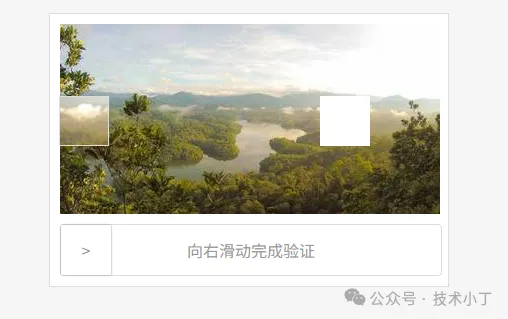
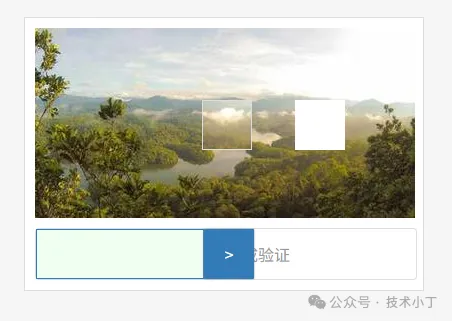
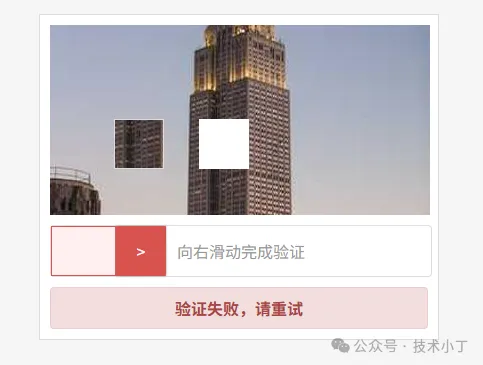
滑动验证码的核心交互流程包括图像加载、拼图生成、用户拖拽和验证判断四个阶段,用户通过拖拽右侧滑块向右移动,使拼图块与背景图像中的缺口对齐,验证成功时显示绿色成功提示,失败则显示红色错误信息并自动重置。
完整代码
<!DOCTYPE html><html lang="zh-CN"><head> <meta charset="UTF-8"> <meta name="viewport" content="width=device-width, initial-scale=1.0"> <title>滑动验证码</title> <style> * { margin: 0; padding: 0; box-sizing: border-box; } body { background: #f5f5f5; } .container { display: flex; padding: 20px; justify-content: center; } .verify-container { background: #fff; width:400px; padding: 10px; border: 1px solid #ddd; user-select: none; } .verify-img { width: 380px; height: 190px; margin-bottom: 10px; position: relative; } .verify-bar-box { width: 380px; height: 50px; line-height: 50px; position: relative; background: #FFFFFF; text-align: center; box-sizing: content-box; border: 1px solid #ddd; border-radius: 4px; color: #999; } .verify-left-bar { background: #f0fff0; position: absolute; top: 0; left: 0; height: 50px; } .verify-move-block { position: absolute; top: 0; left: 0; background: #fff; cursor: pointer; box-sizing: content-box; box-shadow: 0 0 2px #888888; border-radius: 1px; width: 50px; height: 50px; } .verify-sub-block { position: absolute; border: 1px solid #ddd; height: 50px; left: -2px; top: -201px; }
.verify-result { margin-top: 10px; padding: 8px 12px; text-align: center; border-radius: 4px; font-weight: bold; display: none; }
.verify-result.success { background-color: #dff0d8; color: #3c763d; border: 1px solid #d6e9c6; display: block; }
.verify-result.fail { background-color: #f2dede; color: #a94442; border: 1px solid #ebccd1; display: block; } .loading-indicator { padding: 5px 10px; border-radius: 4px; } </style></head><body><div class="container"> <div class="verify-container"> <div class="verify-box"> <div class="verify-img"> <img class="back-img" src="" style="width:100%;height:100%;"/> <div class="loading-indicator" id="backImgLoading" style="position:absolute;top:50%;left:50%;transform:translate(-50%,-50%);color:#666;font-size:14px;display:none;">加载中...</div> </div> <div class="verify-bar-box"> <span class="verify-msg">向右滑动完成验证</span> <div class="verify-left-bar"></div> <div class="verify-move-block"> <span>></span> <div class="verify-sub-block"> <img class="block-img" src="" style="width:100%;height:100%;"/> </div> </div> </div> </div> <div class="verify-result" id="verifyResult"></div> </div></div><script> var verifyBarBox = document.querySelector('.verify-bar-box'); var moveBlock = document.querySelector('.verify-move-block'); var verifyLeftBar = document.querySelector('.verify-left-bar'); var backImg = document.querySelector('.back-img'); var subBlock = document.querySelector('.verify-sub-block'); var blockImg = document.querySelector('.block-img'); var verifyResult = document.getElementById('verifyResult'); var backImgLoading = document.getElementById('backImgLoading');
var startX = 0; var isDragging = false; var maxWidth = verifyBarBox.offsetWidth - moveBlock.offsetWidth;
var imgUrl = 'https://picsum.photos/380/190'; var imgWidth = 380; var imgHeight = 190; var bolckSize = 50; var targetX = 0; var targetY = 0; var tolerance = 5; init(); async function init() { // 显示加载指示器 showLoading() targetX = Math.floor(Math.random() * (imgWidth - bolckSize - 60)) + 30; targetY = Math.floor(Math.random() * (imgHeight - bolckSize - 20)) + 10; var img = await loadImg(imgUrl+'?'+Math.random()); // 创建背景画布并绘制带缺口的图像 var backCanvas = document.createElement('canvas') backCanvas.width = imgWidth; backCanvas.height = imgHeight; var backCtx = backCanvas.getContext('2d'); backCtx.drawImage(img, 0, 0, 380, 190, 0, 0, imgWidth, imgHeight); backCtx.fillStyle = '#FFFFFF'; backCtx.fillRect(targetX, targetY, 50, 50); backImg.src = backCanvas.toDataURL('image/png'); // 创建拼图块 var canvas = document.createElement('canvas') canvas.width = 50; canvas.height = 50; var ctx = canvas.getContext('2d'); ctx.drawImage(img, targetX, targetY, bolckSize, bolckSize, 0, 0, bolckSize, bolckSize)
blockImg.src = canvas.toDataURL('image/png'); subBlock.style.top = (-201 + targetY) + 'px'; // 隐藏加载指示器 hideLoading() } function showLoading() { backImgLoading.style.display = 'block'; subBlock.style.display = 'none' backImg.style.display = 'none' } function hideLoading() { backImgLoading.style.display = 'none'; subBlock.style.display = 'block' backImg.style.display = 'block' }
// 绘制拼图块 function loadImg(url){ return new Promise((res,rej)=>{ const im = new Image(); im.crossOrigin='anonymous'; im.onload = ()=>res(im); im.onerror= rej; im.src = url; }); }
// 鼠标按下事件 - 开始拖拽 moveBlock.addEventListener('mousedown', function(e) { isDragging = true; startX = e.clientX; moveBlock.style.backgroundColor = '#337AB7'; moveBlock.style.color = '#FFFFFF'; verifyLeftBar.style.border = '1px solid #337AB7'; }); // 鼠标移动事件 - 拖拽过程 document.addEventListener('mousemove', function(e) { if (!isDragging) return; var newLeft = e.clientX - startX - 2; // 限制滑块移动范围 if (newLeft < 0) newLeft = 0; if (newLeft > maxWidth) newLeft = maxWidth;
moveBlock.style.left = newLeft + 'px'; verifyLeftBar.style.width = newLeft + 'px'; verifyLeftBar.style.border = '1px solid #337AB7'; }); // 鼠标释放事件 - 结束拖拽 document.addEventListener('mouseup', function() { if (!isDragging) return; isDragging = false; var currentPosition = moveBlock.offsetLeft; if (Math.abs(currentPosition - targetX) <= tolerance) { moveBlock.style.backgroundColor = '#5CB85C'; moveBlock.style.color = '#FFFFFF'; verifyLeftBar.style.border = '1px solid #5CB85C';
// 显示成功提示 verifyResult.textContent = '验证成功!'; verifyResult.className = 'verify-result success'; return; } moveBlock.style.backgroundColor = '#D9534F'; moveBlock.style.color = '#FFFFFF'; verifyLeftBar.style.border = '1px solid #D9534F'; verifyLeftBar.style.backgroundColor = '#fff0f0'; // 显示失败提示 verifyResult.textContent = '验证失败,请重试'; verifyResult.className = 'verify-result fail'; // 滑块回弹动画 moveBlock.style.transition = 'left 0.8s'; moveBlock.style.left = '0px';
verifyLeftBar.style.transition = 'width 0.8s'; verifyLeftBar.style.width = '0px';
// 动画结束后清除过渡效果 setTimeout(() => { init() moveBlock.style.transition = ''; verifyLeftBar.style.transition = ''; moveBlock.style.backgroundColor = '#FFFFFF'; moveBlock.style.color = '#999'; verifyLeftBar.style.backgroundColor = '#F0FFF0'; // 清除验证结果提示 verifyResult.className = 'verify-result'; }, 800); });</script></body></html>0 条评论


八年开发萌新-可接单
普通用户
- 从业日期: 2014/03/20
- 性别: 男
口头禅
每天搬一点,幸福多一点
68
发帖数
99
源码数
0
接单
2
获赞
13
获评





{{commentItem.nickName}}
{{formatIntervalTime(commentItem.createTime)}}{{childComment.nickName}} {{childComment.replyNickName}}
{{formatIntervalTime(childComment.createTime)}}