八年开发萌新-可接单
免费
使用 HTML + JavaScript 实现红包雨游戏(附完整代码)
随着618、双十一等电商购物节的兴起,各种互动营销活动成为了吸引用户的重要手段。其中,"红包雨"作为一种趣味性强、参与度高的互动形式,深受用户喜爱。本文将介绍如何使用 HTML、CSS 和 JavaS
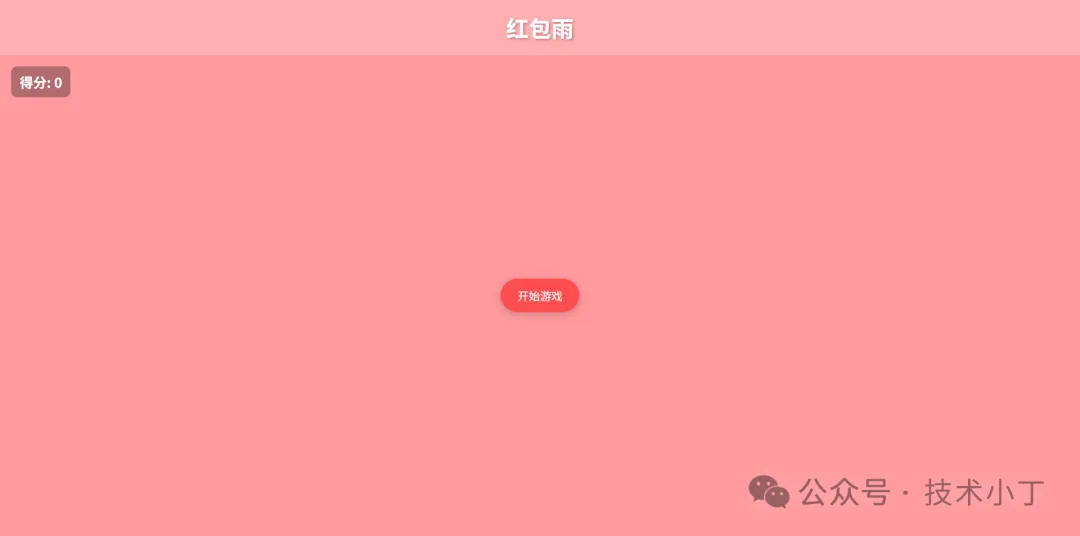
随着618、双十一等电商购物节的兴起,各种互动营销活动成为了吸引用户的重要手段。其中,"红包雨"作为一种趣味性强、参与度高的互动形式,深受用户喜爱。本文将介绍如何使用 HTML、CSS 和 JavaScript 实现一个完整的红包雨游戏,帮助开发者快速搭建类似电商平台的节日互动活动页面。
效果演示
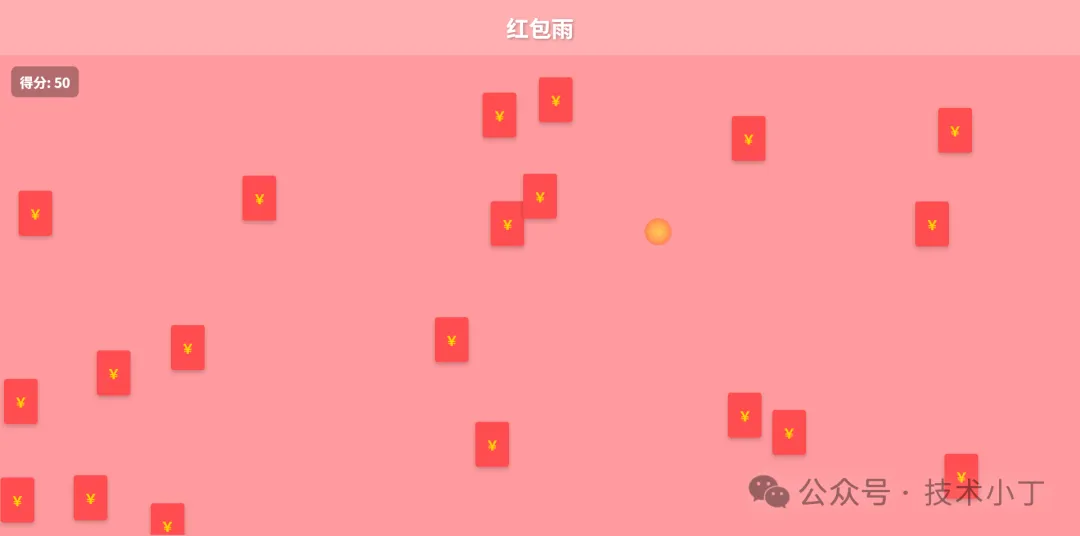
本系统模拟了典型的红包雨互动场景,玩家需要在限定时间内尽可能多地点击从天而降的红包来获得积分。游戏具有以下特点:
红包从屏幕顶部随机位置飘落
点击红包可获得积分,并伴有炫酷的爆炸动画效果
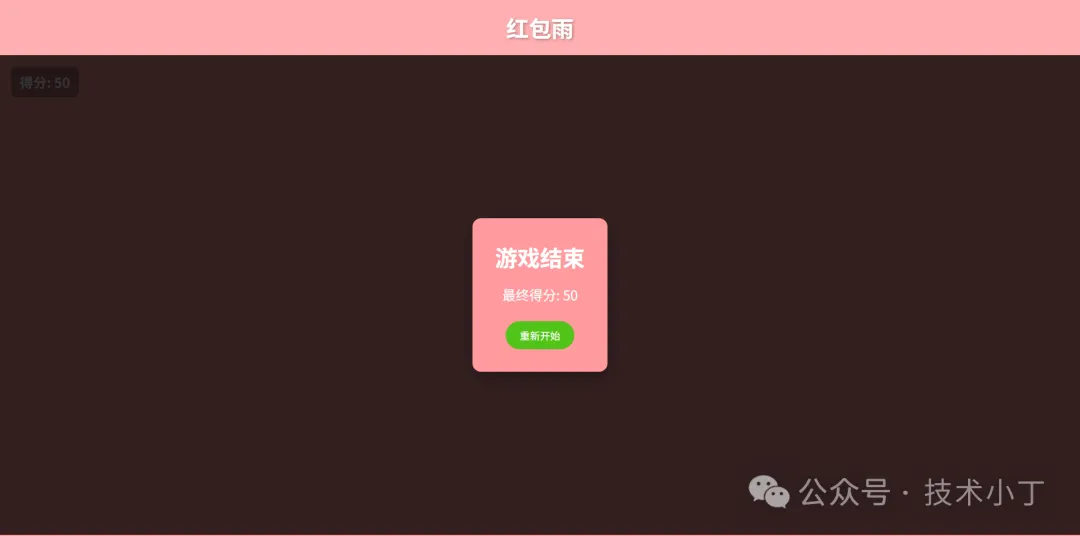
游戏结束后显示最终得分,并支持重新开始
页面结构
系统主要包括以下几个功能区域:
主体区域
主体区域是游戏的核心交互区域,包含了游戏的主要元素:
得分显示:实时显示当前获得的积分
开始按钮:触发游戏启动
遮罩层:游戏结束后显示结果和重新开始选项
<div class="main">
  <div class="score">得分: <span id="score-value">0</span></div>
  <button id="start-btn" class="start-button" onclick="startGame()">开始游戏</button>
  <!-- 遮罩层 -->
  <div id="overlay" class="overlay hidden">
    <div class="overlay-content">
      <h2>游戏结束</h2>
      <p>最终得分: <span id="final-score">0</span></p>
      <button id="restart-btn" class="restart-button" onclick="startGame()">重新开始</button>
    </div>
  </div>
</div>
红包元素
红包是游戏中的核心互动元素,由 js 生成,并通过CSS样式和动画实现飘落效果。
.red-packet {
    position: absolute;
    width: 60px;
    height: 80px;
    background: #ff4d4f;
    border-radius: 5px;
    cursor: pointer;
    z-index: 5;
    animation: fall linear forwards;
    box-shadow: 0 4px 8px rgba(0, 0, 0, 0.2);
}
.red-packet::before {
    content: "¥";
    position: absolute;
    top: 50%;
    left: 50%;
    transform: translate(-50%, -50%);
    color: gold;
    font-size: 24px;
    font-weight: bold;
}
@keyframes fall {
    to {
        transform: translateY(100vh);
    }
}
核心功能实现
游戏状态管理
通过几个关键变量控制游戏状态。
var score = 0; // 当前得分
var gameActive = false; // 游戏是否进行中
var gameTimer; // 游戏计时器
var packetInterval; // 红包生成定时器
游戏启动流程
当用户点击"开始游戏"按钮时,重置游戏状态,隐藏开始按钮和遮罩元素,开始生成红包,并设置游戏10秒后结束。
function startGame() {
  score = 0;
  updateScore();
  gameActive = true;
  startButton.style.display = 'none';
  overlay.classList.add('hidden');
  packetInterval = setInterval(createRedPacket, 300);
  gameTimer = setTimeout(endGame, 10000);
}
红包生成机制
红包以固定间隔在随机的水平位置生成,下落速度设置为5-10秒,并绑定点击事件。
function createRedPacket() {
  if (!gameActive) return;
  var packet = document.createElement('div');
  packet.className = 'red-packet';
  var leftPos = Math.random() * (window.innerWidth - 60);
  packet.style.left = `${leftPos}px`;
  var duration = 5 + Math.random() * 5;
  packet.style.animationDuration = `${duration}s`;
  packet.addEventListener('click', () => {
    if (!gameActive) return;
    score += 10;
    updateScore();
    createClickEffect(event.clientX, event.clientY);
    packet.remove();
  });
  packet.addEventListener('animationend', () => {
    packet.remove();
  });
  mainContainer.appendChild(packet);
}
点击爆炸效果
为了提升用户体验,游戏实现了点击爆炸效果。
function createClickEffect(x, y) {
  var effect = document.createElement('div');
  effect.className = 'click-effect';
  effect.style.left = `${x - 15}px`;
  effect.style.top = `${y - 15}px`;
  document.body.appendChild(effect);
  setTimeout(() => {
    effect.remove();
  }, 500);
}
游戏结束处理
游戏时间结束后自动清理现场并显示结果。
<!DOCTYPE html>
<html lang="zh-CN">
<head>
  <meta charset="UTF-8">
  <meta name="viewport" content="width=device-width, initial-scale=1.0">
  <title>红包雨游戏</title>
  <style>
      * {
          margin: 0;
          padding: 0;
          box-sizing: border-box;
      }
      .container {
          width: 100vw;
          height: 100vh;
          overflow: hidden;
          position: relative;
          background: #ff9a9e;
      }
      .header {
          text-align: center;
          padding: 20px;
          background-color: rgba(255, 255, 255, 0.2);
      }
      .header h1 {
          font-size: 40px;
          color: #fff;
          text-shadow: 2px 2px 4px rgba(0, 0, 0, 0.3);
      }
      .main {
          position: relative;
          width: 100%;
          height: calc(100% - 100px);
          overflow: hidden;
      }
      .score {
          position: absolute;
          top: 20px;
          left: 20px;
          font-size: 24px;
          font-weight: bold;
          color: #fff;
          z-index: 10;
          background: rgba(0, 0, 0, 0.3);
          padding: 10px 15px;
          border-radius: 10px;
      }
      .start-button {
          position: absolute;
          top: 50%;
          left: 50%;
          transform: translate(-50%, -50%);
          padding: 15px 30px;
          font-size: 20px;
          background-color: #ff4d4f;
          color: white;
          border: none;
          border-radius: 50px;
          cursor: pointer;
          z-index: 20;
          box-shadow: 0 4px 15px rgba(0, 0, 0, 0.2);
          transition: all 0.3s ease;
      }
      .start-button:hover {
          box-shadow: 0 4px 10px rgba(0,0,0,0.5);
      }
      .overlay {
          position: absolute;
          top: 0;
          left: 0;
          width: 100%;
          height: 100%;
          background-color: rgba(0, 0, 0, 0.8);
          display: flex;
          justify-content: center;
          align-items: center;
          z-index: 100;
      }
      .overlay.hidden {
          display: none;
      }
      .overlay-content {
          text-align: center;
          background: #ff9a9e;
          padding: 40px;
          border-radius: 15px;
          box-shadow: 0 10px 30px rgba(0, 0, 0, 0.3);
      }
      .overlay-content h2 {
          font-size: 40px;
          color: #fff;
          margin-bottom: 20px;
      }
      .overlay-content p {
          font-size: 24px;
          color: #fff;
          margin-bottom: 30px;
      }
      .restart-button {
          padding: 12px 25px;
          font-size: 18px;
          background-color: #52c41a;
          color: white;
          border: none;
          border-radius: 50px;
          cursor: pointer;
          transition: all 0.3s ease;
      }
      .restart-button:hover {
          box-shadow: 0 4px 10px rgba(0,0,0,0.5);
      }
      .red-packet {
          position: absolute;
          width: 60px;
          height: 80px;
          background: #ff4d4f;
          border-radius: 5px;
          cursor: pointer;
          z-index: 5;
          animation: fall linear forwards;
          box-shadow: 0 4px 8px rgba(0, 0, 0, 0.2);
      }
      .red-packet::before {
          content: "¥";
          position: absolute;
          top: 50%;
          left: 50%;
          transform: translate(-50%, -50%);
          color: gold;
          font-size: 24px;
          font-weight: bold;
      }
      @keyframes fall {
          to {
              transform: translateY(100vh);
          }
      }
      .click-effect {
          position: absolute;
          width: 30px;
          height: 30px;
          background: radial-gradient(circle, yellow, orange, red);
          border-radius: 50%;
          pointer-events: none;
          animation: explode 0.5s ease-out forwards;
      }
      @keyframes explode {
          0% {
              transform: scale(0);
              opacity: 1;
          }
          100% {
              transform: scale(3);
              opacity: 0;
          }
      }
  </style>
</head>
<body>
<div class="container">
  <div class="header">
    <h1>红包雨</h1>
  </div>
  <div class="main">
    <div class="score">得分: <span id="score-value">0</span></div>
    <button id="start-btn" class="start-button" onclick="startGame()">开始游戏</button>
    <!-- 遮罩层 -->
    <div id="overlay" class="overlay hidden">
      <div class="overlay-content">
        <h2>游戏结束</h2>
        <p>最终得分: <span id="final-score">0</span></p>
        <button id="restart-btn" class="restart-button" onclick="startGame()">重新开始</button>
      </div>
    </div>
  </div>
</div>
<script>
  // 游戏变量
  var score = 0;
  var gameActive = false;
  var gameTimer;
  var packetInterval;
  // DOM元素引用
  var startButton = document.getElementById('start-btn');
  var overlay = document.getElementById('overlay');
  var scoreValue = document.getElementById('score-value');
  var finalScore = document.getElementById('final-score');
  var mainContainer = document.querySelector('.main');
  // 开始游戏
  function startGame() {
    score = 0;
    updateScore();
    gameActive = true;
    startButton.style.display = 'none';
    overlay.classList.add('hidden');
    packetInterval = setInterval(createRedPacket, 300);
    gameTimer = setTimeout(endGame, 10000);
  }
  // 创建红包
  function createRedPacket() {
    if (!gameActive) return;
    var packet = document.createElement('div');
    packet.className = 'red-packet';
    var leftPos = Math.random() * (window.innerWidth - 60);
    packet.style.left = `${leftPos}px`;
    var duration = 5 + Math.random() * 5;
    packet.style.animationDuration = `${duration}s`;
    packet.addEventListener('click', () => {
      if (!gameActive) return;
      score += 10;
      updateScore();
      createClickEffect(event.clientX, event.clientY);
      packet.remove();
    });
    packet.addEventListener('animationend', () => {
      packet.remove();
    });
    mainContainer.appendChild(packet);
  }
  // 更新得分显示
  function updateScore() {
    scoreValue.textContent = score;
  }
  // 创建点击效果
  function createClickEffect(x, y) {
    var effect = document.createElement('div');
    effect.className = 'click-effect';
    effect.style.left = `${x - 15}px`;
    effect.style.top = `${y - 15}px`;
    document.body.appendChild(effect);
    setTimeout(() => {
      effect.remove();
    }, 500);
  }
  // 结束游戏
  function endGame() {
    gameActive = false;
    clearInterval(packetInterval);
    clearTimeout(gameTimer);
    var packets = document.querySelectorAll('.red-packet');
    packets.forEach(packet => {
      packet.remove();
    });
    finalScore.textContent = score;
    overlay.classList.remove('hidden');
  }
</script>
</body>
</html>